> Asynchronous BIG Data Web Scraper with Flask/CustomTkinter and SQL
// Created at: 17-08-2026
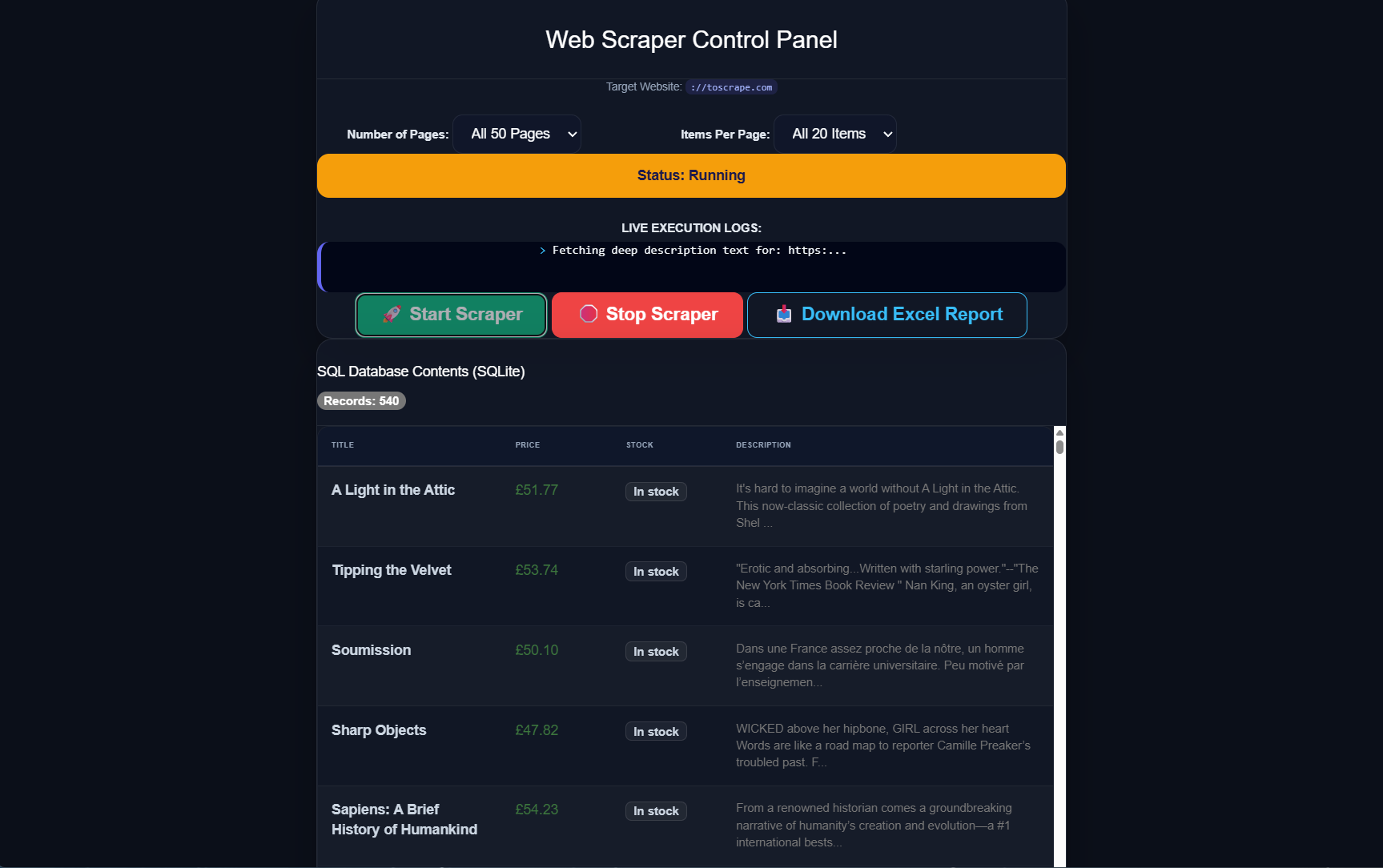
[Project Overview]
The system is custom-built to eliminate the ultimate bottleneck of traditional scrapers: user interface freezing and catastrophic RAM exhaustion when managing large-scale data sets exceeding 100,000 entities. Through this structural decoupling, the platform operates as an industrial-grade, crash-immune automated data pipeline. The server's memory consumption remains flat and highly predictable from record 1 to record 100,000+. The SQLite database saves data chunks continuously, ensuring emergency stop routines never corrupt files or drop scraped assets, while providing the client with a smooth, real-time live-monitoring dashboard.
[_Case Study]
>__Enterprise Web Automation Platform utilizing a Decoupled Dashboard/Worker Architecture.
1. Non-Blocking Thread Isolation (The Worker Decoupling Model) At the core of this system is the elimination of application-wide blocking operations. In typical web architectures, running an intense browser automation script inside a standard request-response lifecycle causes the web server's listening socket to hang, completely halting processing, causing browser windows to display "Not Responding," and generating critical gateway timeouts. This infrastructure handles the problem by dividing execution into Command and Execution states: • The Command Vector: The web server receives the initial target layout variables, instantly instantiates an isolated operating system background thread (threading.Thread), and hands over control parameters. • Socket Release: The web server immediately fires a blank HTTP 204 handshake back to the client interface. The parent web server drops network hooks instantly, remaining completely open to monitor system statuses, accept incoming API connections, or route database pages. 2. Isolated Async Core Engine Execution Bound (asyncio) Inside the newly spooled background thread, the system establishes a native, thread-isolated event loop scheduler running via asyncio. This loop manages the lifecycle of the headless browser framework (async_playwright). By packaging the web rendering automation routines into an asynchronous runtime sandbox entirely separate from the Flask master process, the script operates within its own execution boundary. It optimizes network resource utilization through co-routine scheduling without causing concurrency deadlocks, file handle race conditions, or CPU starvation on the main web server threads. 3. Dual-Layer Asynchronous Concurrency ClusterThe operational data-mining model operates a highly efficient two-tiered data retrieval matrix designed to balance structured index parsing with high-speed parallel extraction: • The Sequential Lookahead Phase: The parent browser tab interacts with the site's directory catalog layout. It works through rows linearly, pulling initial tracking metadata (title, price, stock) and cleaning dynamic relative path selectors (../) to calculate permanent, absolute target URLs (full_target_url). • The Parallel Burst Phase (asyncio.gather): Instead of navigating back and forth across a single browser window—which introduces immense network latency overhead—the engine dumps these calculated absolute targets straight into a concurrency task array and fires them simultaneously using an aggregate operational burst handler. As the worker tabs run, Playwright manages requests concurrently by switching active processing contexts whenever a tab is waiting for network packets from the target server. This keeps the network pipe maximized, pulling text data at the absolute limit of the host connection. 4. Hard Drive Serialization & Flat RAM Guard Architecture When scaling data pipelines to large capacities (100k+ targets), holding heavy array records directly in application memory causes linear allocation growth, overflowing system resources and triggering out-of-memory kernel panics. This script avoids this bottleneck by completely removing global in-memory data accumulation. The architecture guarantees a completely flat, predictable memory heap through Page-Level Batch Flushing: • Every concurrently spawned tab enforces explicit cleanup actions immediately upon reading text nodes inside a robust try/finally structure, forcing an intentional tab crash (await detail_page.close()) to release RAM hooks instantly. Once all parallel tabs resolve descriptions for the current page block, the script packages the data slice into a transient pandas. • DataFrame flushes those records directly onto disk storage inside an SQLite file repository using native python context managers (with sqlite3.connect). • Memory references are instantly dropped after the database save transaction, resetting the application memory footprint back to a baseline minimum before clicking the "Next" button to pull the subsequent index batch. 5. On-Demand Stream Compilation (Memory Sanitization) The application removes all Excel spreadsheet creation routines from the core background automation engine loop. The .xlsx document format is highly compressed, and rendering thousands of cells inside a long-running process wastes processing power and risks database corruption if a process halts midway. Instead, file conversions happen completely on-demand inside the /download routing lifecycle. When a user clicks the export button an isolated file database block reads the complete current collection dataset using a clean context manager. The records load into a memory stream (io.BytesIO()) and compile into Excel's open xml formatting layout via the openpyxl engine. Flask pushes this memory stream straight back to the client browser as an attachment download (scraped_data_report.xlsx). Once sent, the garbage collector drops the temporary byte buffers immediately, keeping server disk usage clean.
=============================================================================================
                        ENTERPRISE DECOUPLED SCRAPER PIPELINE MATRIX
=============================================================================================
  [ CLIENT SIDE WEB UI ]             [ FLASK WEB BACKEND ]        [ ASYNC AUTOMATION WORKER ]
   index.html + main.js                     app.py                        scraper.py

            |                                 |                                |
 1. User sets Dropdowns                       |                                |
 2. Clicks "Start Scraper"                    |                                |

            |--- GET /start?pages=X&items=Y ->|                                |
            |                                 | 3. Creates Background Thread   |
            |                                 |--- threading.Thread().start() >|
            |<-- Returns HTTP 204 Immediate --|                                | 4. Spins isolated
            |                                 |                                |    async event loop
            |                                 |                                |    & initializes
            |=================================|                                |    Headless Chromium
            |   REAL-TIME STATUS POLLING LOOP |                                |
            |=================================|                                |
 6. main.js |                                 |                                |
    Interval|--- GET /status ---------------->|                                |
    Fires   |                                 | 7. Performs SQL COUNT(*) check |

            |                                 |    Reads global log states     |
            |<-- Returns JSON State Payload --|                                |
 8. DOM Mod:|                                 |                                |====================
    Updates |                                 |                                | CATALOG SEARCH LOOP
    Console,|                                 |                                |====================
    Alerts  |                                 |                                |
    & Tables|                                 |                                | 9. page.goto() index

            |                                 |                                | 10. Parses items
            |                                 |                                |     via .product_pod
            |                                 |                                | 11. Strips price/stock
            |                                 |                                | 12. Calculates fixed
            |                                 |                                |     full_target_url
            |                                 |                                |         ||
            |                                 |                                |         || gather() Burst
            |                                 |                                |        \  /
            |                                 |                                |         \/
            |                                 |                                | [scrape_book_desc]
            |                                 |                                |  - Opens tab context
            |                                 |                                |  - Extracts inner text
            |                                 |                                |  - Closes tab instantly
            |                                 |                                | 13. Resolves text list
            |                                 |                                |
            |                                 |                                |====================
            |                                 |                                | HARD DISK WRITES
            |                                 |                                |====================
            |                                 |                                |
            |                                 |                                | 14. Packs dataframe
            |                                 |                                | 15. Open DB Context
            |                                 |                                |     with sqlite3
            |                                 |                                | 16. df.to_sql(save_mode)
            |                                 |                                | 17. Context safely close
            |                                 |                                |
 18. Table  |                                 |                                | 18. Clicks next page
     Paging |-- GET /api/data?page=P -------->|                                |     Loops until done.

            |<-- Returns JSON Row Chunk ------|                                | 20. Shuts browser down
            |                                 |                                | 21. Set global status:
            |                                 |                                |     Finished
            |=================================|                                |
            |   ON-DEMAND EXCEL REPORT EXPORT |                                |
            |=================================|                                |
 22. Clicks |                                 |                                |
  "Download"|--- GET /download -------------->|                                |

            |                                 | 23. Locks database file context|
            |                                 |     with sqlite3.connect()     |
            |                                 | 24. pd.read_sql_query()        |
            |                                 | 25. Allocates io.BytesIO() RAM |
            |                                 | 26. Compiles spreadsheet bytes |
            |                                 |     via openpyxl format writer |
            |                                 | 27. Clears temporary RAM buffers|
            |<-- Streams Binary Excel Download|                                |
=============================================================================================
>__Automation & Persistence Layer (Isolated Async Engine - scraper.py + SQLite)
This is the background processor execution engine running inside an independent asynchronous event loop framework (asyncio) completely decoupled from the rest of the application ecosystem. • Concurrent Execution Bursts (asyncio.gather): For every primary catalog overview page, the Playwright engine parses basic catalog details and computes explicit, fixed absolute URL paths (full_target_url). It then triggers simultaneous worker bursts, opening multiple browser tab context instances in parallel to extract deep item descriptions at maximum network capacity. • RAM Guarding Construction: Every individual description tab explicitly enforces memory cleanup immediately upon scraping text nodes via a strict resource container exit (finally: await detail_page.close()). Collected data sets are never stacked infinitely inside global python lists; after completing a page block, the entire layout slice maps to a transient pandas. • DataFrame and is flushed incrementally to hard disk storage inside the SQLite file repository using context-managed query transactions (with sqlite3.connect).
===================================================================================
                   LAYER 3: ASYNC AUTOMATION WORKER MECHANICS
===================================================================================

   [ FLASK BACKGROUND THREAD ]        [ PLAYWRIGHT PARENT PAGE ]     [ ASYNC WORKER POOL ]
     (start_scraper_thread)                (Catalog Index)           (scrape_book_desc)

               |                                  |                           |
 1. loop.run_until_complete()                     |                           |
  ----+------------------------------------------>|                           |

                                                  |                           |
   =============================================================================
    A. CONCURRENT EXECUTION BURST: Master Catalog Scan & Parallel Tab Spawning
   =============================================================================

                                                  |                           |
                                          2. page.goto()                      |
                                          3. Extracts item metadata vectors   |
                                             (Title, Price, Stock)            |
                                          4. Compels fixed absolute paths     |
                                             (full_target_url)                |

                                                  |                           |
                                                  |-- 5. asyncio.gather() --->|
                                                  |      Spawns X active tabs |
                                                  |      concurrently         |
                                                  |                           | 6. detail_page.goto()
                                                  |                           | 7. Parses inner DOM text
                                                  |                           |    (#product_description + p)
                                                  |                           |
   =============================================================================
    B. RAM GUARDING & HDD SERIALIZATION: Immediate Resource Sanitization
   =============================================================================

                                                  |                           |
                                                  |                           | 8. Enforces explicit exit
                                                  |                           |    finally:
                                                  |                           |    detail_page.close()
                                                  |                           |    (RAM released instantly)
                                                  |<-- 9. Returns text block --|
                                                  |
                                         10. Collects batch dataset arrays
                                         11. Instantiates temporary DataFrame
                                         12. Opens Context Manager on disk
                                             with sqlite3.connect(DB_NAME):
                                         13. df.to_sql(save_mode="append")
                                             (Data flushed to HDD instantly)
                                         14. Drops active local variable refs
                                             (Garbage collection clears heap)
                                         15. Clicks "Next" page element
                                             Loops execution workflow

               |                                  |                           |
===================================================================================
>__Presentation Layer (Reactive Frontend - index.html + main.js)
The graphical interface is a modern control dashboard featuring a high-end Glassmorphic and VS-Code-inspired live console built via Bootstrap. Its responsibilities are strictly behavioral and visual: • Zero UI Overload: It never loads thousands of raw table records directly into the browser DOM at once, which would instantly freeze or crash the user's browser tab. • Asynchronous Status Polling: It features an internal asynchronous AJAX Fetch loop executing every 2 seconds to poll the server for lightweight telemetry payload updates, drawing only the current string pointer (CURRENT_LOG) and execution state (SCRAPER_STATUS). • Paginated Grid Views: It interacts with the underlying database file using API-level server-side pagination, requesting small row slices (10–20 books at a time) explicitly when navigating the workspace.
===================================================================================
                  LAYER 1: REACTIVE FRONTEND ENGINE MECHANICS
===================================================================================

       [ USER ACTION ]           [ BROWSER DOM INTERFACE ]      [ AJAX ENGINE (main.js) ]

              |                              |                             |
  Dropdowns / Click Buttons                  |                             |
  ------------( Triggers Event )------------>|                             |

                                             |-- ( Extracts values )------>|
                                             |                             |-- fetch('/start') ->
                                             |                             |
   =============================================================================
    A. STATUS POLLING CYCLE: Runs continuously on a 2-Second setInterval Window
   =============================================================================

                                             |                             |
                                             |<-- ( Fires every 2000ms )---|
                                             |                             |-- fetch('/status') ->
                                             |                             |
                                             |<-- [ JSON Payload Return ]--|
                                             |    { status, current_log,   |
                                             |      csv_exists, rows_len } |
     - Updates text: #statusText             |                             |
     - Updates console: #liveLog             |                             |
     - Toggles display alert colors          |<-- ( Re-renders Layout )----|
     - Enables/Disables action button states |                             |

                                             |                             |
   =============================================================================
    B. MEMORY-SAFE PAGINATED DATA GRID: Completely isolates the Browser DOM
   =============================================================================

                                             |                             |
                                             |--- ( Click Next Page )----->|
                                             |                             |-- fetch('/api/data') ->
                                             |                             |   ?page=2&per_page=10
                                             |                             |
                                             |<-- [ JSON Paginated Chunk ]-|
                                             |    { data: [10 rows max],   |
                                             |      total_pages: X }       |
     - Purges past HTML table body nodes     |                             |
     - Maps exactly 10 new array rows to DOM |<-- ( Injects Clean HTML )---|
     - Keeps browser footprint lightweight   |                             |

                                             |                             |
===================================================================================
>__Core Web Server Layer (Flask Orchestrator - app.py)
The Flask web engine acts strictly as an asynchronous dispatcher and network resource gatekeeper. It completely avoids executing long-running extraction routines on its main execution thread, which would block incoming HTTP requests and trigger gateway timeouts. • Worker Decoupling: Upon receiving a client initialization signal at /start, Flask immediately offloads the runtime arguments (target pages and item limits) to an isolated background thread context (threading.Thread) and returns a rapid HTTP 204 (No Content) code to clear the browser network socket. • Micro-Queries for Statistics: The progress tracking endpoints gauge execution boundaries using ultra-fast database count aggregations (SELECT COUNT(*)), skipping slow analytical parsing of full active table structures. • On-Demand Excel Generation: Massive spreadsheet processing is decoupled from the automated scraping loop. The .xlsx document is compiled dynamically into server memory using an isolated memory byte stream (io.BytesIO) and the openpyxl engine layout only when requested by the user via the download action hook, maintaining zero residual file accumulation on disk.
===================================================================================
                   LAYER 2: FLASK CORE ORCHESTRATOR MECHANICS
===================================================================================

     [ CLIENT INTERFACE ]             [ FLASK WEB ENGINE ]         [ OS BACKGROUND THREAD ]
         (main.js / UI)                     app.py                       (Worker Loop)

               |                              |                               |
  1. Fires GET /start?pages=X                 |                               |
  ----+-------------------------------------->|                               |

      |                                       | 2. Instantiates Thread Context|
      |                                       |---- threading.Thread().start()-->|
      |                                       |                               | 3. Fires isolated
      |<-- Returns HTTP 204 (No Content) -----|                               |    async engine loop
      |    (Frees browser socket instantly)   |                               |    (scraper.py)
      |                                       |                               |
   =============================================================================
    A. STATUS ROUTING LOGIC: Ultra-Fast Aggregate Database Telemetry
   =============================================================================

      |                                       |                               |
  4. Polls GET /status                        |                               |
  ----+-------------------------------------->|                               |

      |                                       | 5. Direct file access loop    |
      |                                       |    with sqlite3.connect()     |
      |                                       |    - Runs: SELECT COUNT(*)    |
      |                                       |    - Reads global string text |
      |<-- Returns Lightweight JSON ----------|                               |
      |    (Negligible CPU overhead)          |                               |
      |                                       |                               |
   =============================================================================
    B. ON-DEMAND EXCEL GENERATION: 100% RAM Streamed, Zero Server Disk Load
   =============================================================================

      |                                       |                               |
  6. Clicks "Download Report"                 |                               |
  ----+-------------------------------------->|                               |

      |                                       | 7. Opens context manager      |
      |                                       |    with sqlite3.connect()     |
      |                                       | 8. pd.read_sql_query()        |
      |                                       | 9. Spools io.BytesIO() RAM stream
      |                                       | 10. openpyxl builds file layout
      |                                       |     directly into byte buffer |
      |                                       | 11. Closes file handles       |
      |<-- Streams raw Binary Data Output ----|                               |
      |    (Browser triggers save prompt)     | 12. Garbage collection purges |
      |                                       |     temporary buffer from RAM |
      |                                       |                               |
===================================================================================