> Document Automation Engine
// Created at: 09-08-2026
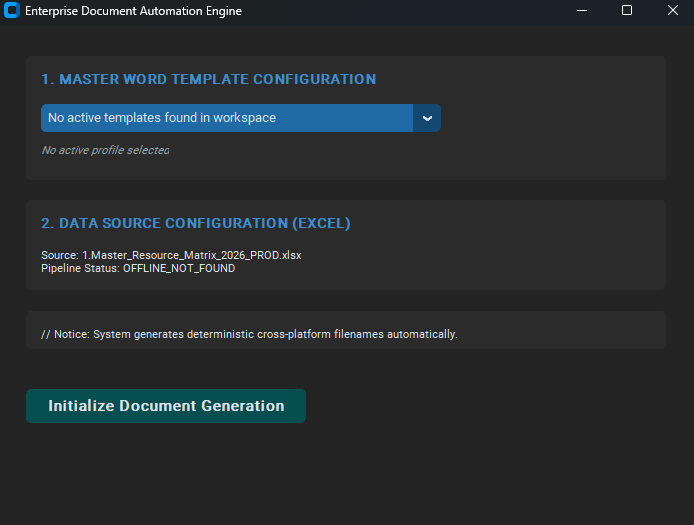
[Project Overview]
This engine functions as an enterprise-grade desktop data-pipelining application designed to automate high-volume document compilation by transforming dense, complex spreadsheet matrix tables into isolated, formatted Word document outputs. Operating on top of a custom-themed standalone GUI interface (CustomTkinter), the script provides a clean abstraction mechanism for converting single-file tracking records into standalone files without incurring systemic memory overheads or file IO bottlenecks. The tool is purpose-built to completely eliminate repetitive manual copy-pasting tasks, processing highly customized items from static multi-tab data structures in very short time.
[_Case Study]
>__Unified Process Architecture
The following map delineates how the application ingests the database matrix, resolves dynamic workspace attributes, isolates internal structural identities, and routes execution tokens into localized IO write streams
+---------------------------------------------------------------------------------+

 |                             DATA INGESTION PIPELINE                             |
 |      Pandas loads Matrix Stream -> Resolves Active_Nodes_Sheet Frame Bounds     |
 +---------------------------------------------------------------------------------+
                                          |
                      +-------------------+-------------------+

                      | (Dynamic Context-Token Routing)       |
                      v                                       v
          +-----------------------+               +-----------------------+

          |  TEMPLATE_TYPE_BETA   |               |  TEMPLATE_TYPE_ALPHA  |
          |  (Atomic Node Model)  |               | (Cluster Team Model)  |
          +-----------------------+               +-----------------------+

                      |                                       |
                      v                                       v
 +---------------------------------------+ +---------------------------------------+

 |      ROW & STRING PARSING VECTOR      | |        NODE VALUE CONDENSATION        |
 |  - Extracts Operator via Column Shims | |  - Aggregates cluster matrix teams    |
 |  - Evaluates unique group counters over| |  - Fires Hardcoded Security Filter    |
 |    Composite Keys [Project / Branch]  | |    [System_Root_Override Excluded]    |
 +---------------------------------------+ +---------------------------------------+

                      |                                       |
                      +-------------------+-------------------+
                                          v
 +---------------------------------------------------------------------------------+

 |                           CONTEXT TOKEN INJECTION LAYER                         |
 |       DocxTemplate acts as runtime context compiler via Jinja2 token hooks      |
 +---------------------------------------------------------------------------------+
                                          |
                                          v
 +---------------------------------------------------------------------------------+

 |                           CROSS-PLATFORM OS PERSISTENCE                         |
 |     Regular Expression Filter sanitizes filename buffers -> Writes docs to disk |
 +---------------------------------------------------------------------------------+
>__The Entry Point & UI Layout Architecture
This section of the code represents the initialization layer and the graphical user interface (GUI) topology of the application. It acts as the structural foundation, establishing how the software boots, loads localized workspace properties, runs inline defensive safety checks, and maps individual interactive widgets to their underlying event-driven execution backends. The __init__ constructor plays three critical roles during the lifecycle of the application: • Encapsulation of Application State: It converts a standard, procedural Python script into a formal Object-Oriented application by mapping system file paths, directories, and interface frames directly onto self (the instance memory pool). • Dynamic OS Introspection: It uses a fallback path locator (get_base_path()) to dynamically map absolute system paths for the data source and template directories at runtime. This allows the application to run smoothly whether executed as a loose .py script or compiled into a single .exe binary. • Proactive System Diagnostics: It runs a proactive filesystem check (os.path.exists) directly inside the initialization sequence to immediately verify if the source dataset is available on the host environment before rendering interactive fields to the end user. Object inheritance & base configuration The class uses direct inheritance from ctk.CTk, the top-level main window manager of the customtkinter framework. Calling super().__init__() hooks into the base implementation, establishing the system event loop, generating the underlying native window context, and initializing the UI engine. Cross-platform path abstraction Hardcoding file structures as static strings is an anti-pattern that leads to application failure across different OS environments. By leveraging os.path.join(), this section dynamically switches system directory separators (/ for Unix vs \ for Windows). It builds a bulletproof data pipeline from the data root down to the precise location of the .xlsx production sheet. Structured ui compartmentalization The user interface is built using a hierarchical layout strategy, nesting child blocks inside a parent context box: • Main Container Matrix: The self.main_container frame unifies lookups, enforcing strict boundaries via pack(padx=30, pady=20) to align child forms cleanly without pixel gaps. • Section 1 (The Hook Selector): Groups the template dropdown (CTkOptionMenu) and a dynamic trace status label (self.label_selected_file). It binds selection events directly to the update controller via the argument pointer command=self.update_template_display. • Section 2 (Inline Diagnostic Tracker): Evaluates file paths on boot. It reads the filesystem directly to assign a state string (Verified_Online vs OFFLINE_NOT_FOUND) to the tracker panel, letting the user know if the dataset is ready before execution. • Section 3 (Execution Pipeline Trigger): Draws a clean action button (self.btn_generate). It isolates execution workflows by routing interactions directly into the backend processor through command=self.run_generation.
class DocumentAutomationSuite(ctk.CTk):
    def __init__(self):
        super().__init__()

        self.title("Enterprise Document Automation Engine")
        self.geometry("700x500")

        self.base_dir = get_base_path()
        self.models_dir = os.path.join(self.base_dir, "templates")

        self.excel_source_path = os.path.join(
            self.base_dir, "source", "1.Master_Resource_Matrix_2026_PROD.xlsx"
        )

        # Main Layout Container (Left-aligned spacing)
        self.main_container = ctk.CTkFrame(self, fg_color="transparent")
        self.main_container.pack(fill="both", expand=True, padx=30, pady=20)

        # --- SECTION 1: BLUEPRINT TEMPLATE SELECTION ---
        self.template_frame = ctk.CTkFrame(self.main_container)
        self.template_frame.pack(fill="x", pady=10, anchor="w")

        self.label_title_1 = ctk.CTkLabel(
            self.template_frame, text="1. MASTER WORD TEMPLATE CONFIGURATION",
            font=("Roboto", 14, "bold"), text_color="#3B8ED0"
        )
        self.label_title_1.pack(padx=15, pady=(10, 5), anchor="w")

        # Dropdown configuration
        self.model_list = self.get_template_list()
        self.dropdown_models = ctk.CTkOptionMenu(
            self.template_frame,
            values=self.model_list,
            width=400,
            command=self.update_template_display
        )
        self.dropdown_models.pack(padx=15, pady=5, anchor="w")

        # Active workspace feedback
        self.label_selected_file = ctk.CTkLabel(
            self.template_frame,
            text="No active profile selected",
            font=("Roboto", 11, "italic"),
            text_color="#95a5a6"
        )
        self.label_selected_file.pack(padx=15, pady=(0, 15), anchor="w")

        # --- SECTION 2: CLEAN DATA MATRIX SOURCE ---
        self.data_frame = ctk.CTkFrame(self.main_container)
        self.data_frame.pack(fill="x", pady=10, anchor="w")

        self.label_title_2 = ctk.CTkLabel(
            self.data_frame, text="2. DATA SOURCE CONFIGURATION (EXCEL)",
            font=("Roboto", 14, "bold"), text_color="#3B8ED0"
        )
        self.label_title_2.pack(padx=15, pady=(10, 5), anchor="w")

        # Integrity status monitoring
        status_text = "Verified_Online" if os.path.exists(self.excel_source_path) else "OFFLINE_NOT_FOUND"
        self.label_excel_info = ctk.CTkLabel(
            self.data_frame,
            text=f"Source: {os.path.basename(self.excel_source_path)}\nPipeline Status: {status_text}",
            justify="left", font=("Roboto", 11)
        )
        self.label_excel_info.pack(padx=15, pady=(5, 15), anchor="w")

        # --- SECTION 3: SYSTEM EXECUTION LOGIC ---
        self.exec_frame = ctk.CTkFrame(self.main_container)
        self.exec_frame.pack(fill="x", pady=10, anchor="w")

        self.label_hint = ctk.CTkLabel(
            self.exec_frame,
            text="// Notice: System generates deterministic cross-platform filenames automatically.",
            font=("Roboto", 11)
        )
        self.label_hint.pack(padx=15, pady=(10,0), anchor="w")

        self.btn_generate = ctk.CTkButton(
            self.main_container, text="Initialize Document Generation",
            fg_color="#064e4f", hover=False, height=35, width=280,
            font=("Roboto", 15, "bold"), command=self.run_generation
        )
        self.btn_generate.pack(pady=30, anchor="w")
>__The System Subroutines & Utility Layer
This segment of the codebase encapsulates the utility layer, cross-platform persistence safeguards, and event-driven UI state controllers of the application. These helper functions act as defensive system filters and environment initializers, ensuring data sanity, managing visual reactive loops, and setting up workspace directories before generation loops begin. • sanitize_filename(self, name) This function acts as a defensive filesystem sanitizer. Its core role is to intercept dynamic data tokens extracted from the Excel matrix (such as company names or branch IDs) and clean them before they are used to write output files to disk. It serves as a guard rail against cross-platform I/O execution crashes. • String Cast Guard: It explicitly wraps the input token in a str(name) constructor. This prevents runtime attribute crashes if the incoming Pandas cell contains native numerical types like floats or integers. • Regex Pattern Matching: It passes the string into re.sub(), using a character class regex pattern: r'[\\/*?:"<>|]'. This pattern targets the exact set of reserved characters that are illegal under Windows filesystems (NTFS/FAT32) and Unix filename rules. Every matched character is instantly replaced with an empty string (""). • The execution complexity runs in linear time O(N) relative to the character length of the filename string. By utilizing Python's compiled regular expression engine (written natively in C), character swapping bypasses heavy procedural loops, completing file sanitization in microseconds. • update_template_display(self, choice) This method acts as an event-driven UI reactive state controller. It handles the pipeline interface link between backend validation states and the front-end display panels. Whenever a user interacts with the drop-down template selection menu, this function updates the interface to confirm selection status. • Defensive State Validation: It uses a conditional clause to evaluate the user's choice. It validates the selection by ensuring the choice variable contains data and explicitly checking against the placeholder warning string "No templates". • Dynamic UI Thread Injection: If the validation passes, it accesses the configuration engine via .configure(), changing the tracker label to display the active choice and switching its color to an enterprise emerald green (#2ecc71). If validation fails, it resets the view and flags an alert using an administrative crimson red (#e74c3c). • get_template_list(self) This function serves as the workspace environment initializer and template scanner. It automatically prepares the host workstation's directory structure on launch, reads the template folder, and isolates compatible file types to populate the main dropdown menu. • Idempotent Directory Creation: It runs a defensive check using os.path.exists(). If the targeted template folder is missing from the workspace, it creates the entire directory chain using os.makedirs(). This step ensures the software boots smoothly without throwing file-not-found exceptions on clean deployments. • List Comprehension Filtering: It scans the directory using os.listdir(), passing the results through a list comprehension filter: if f.endswith(".docx"). This isolates Microsoft Word files and filters out hidden system junk like .DS_Store or loose temporary files. • Fallback Resolution Shim: It returns a fallback list containing an explicit warning token (["No active templates..."]) if the folder is empty, preventing dropdown components from crashing due to null arrays. The execution footprint runs in O(M) time complexity, where M is the total count of loose files inside the targeted workspace directory. The list comprehension executes efficiently, minimizing execution delays during application boot cycles.
def sanitize_filename(self, name):
        """Removes illegal characters for cross-platform filesystems."""
        return re.sub(r'[\\/*?:"<>|]', "", str(name))

    def update_template_display(self, choice):
        """Updates UI display cues upon profile selection."""
        if choice and "No templates" not in choice:
            self.label_selected_file.configure(
                text=f"Active Node Hook: {choice}",
                text_color="#2ecc71"
            )
        else:
            self.label_selected_file.configure(text="No profile active", text_color="#e74c3c")

    def get_template_list(self):
        """Initializes folder environments and fetches blueprints."""
        if not os.path.exists(self.models_dir):
            os.makedirs(self.models_dir)
        files = [f for f in os.listdir(self.models_dir) if f.endswith(".docx")]
        return files if files else ["No active templates found in workspace"]
>__The Routing Controller Pipeline
This section of the codebase functions as the orchestration engine and execution router of the entire application. It intercepts user commands from the interface layer, enforces strict gatekeeping protocols, initializes data ingestion from external storage matrices, dynamically streams targeted calculation branches, and provides unified cross-platform success or exception handles. The run_generation controller manages four main execution behaviors: • Defensive Guard Gatekeeping: Intercepts uninitialized or faulty UI parameters before allocating system resources, halting executions early to protect database operations. • Data Stream Ingestion: Opens file streams to read heavy spreadsheet structures, isolating active datasets directly into dataframes (Pandas DataFrame). • Polymorphic Execution Routing: Inspects filename signatures to route data handling tasks to specialized processing routines (logic_template_beta vs logic_template_alpha). • Cross-Platform File Triggering: Handles file system interactions by auto-starting native explorer windows (os.startfile) once document batch exports finish successfully. The routine queries the drop-down menu state using .get(). It runs a validation check using an inline membership constraint (in). If a placeholder error string is detected, it triggers a blocking warning box (messagebox.showerror), halts execution, and returns early, preventing downstream processing failures. The data layer initializes an isolated read operation through pd.read_excel(), targeting a specific tab workbook signature (MAIN_SHEET_NAME). Once the table is loaded, it extracts specific operational target column keys using a list comprehension filtering rule: if col.startswith("Operator"). This approach harvests active dynamic columns efficiently. The pipeline dynamically builds output destination targets using os.path.join(). To prevent file creation exceptions, it runs a file check step. If the destination directory is missing from the environment path, it initializes the directory chain using os.makedirs(). The script uses an conditional tree (if/elif/else) to inspect the string contents of the selected file archetype. It routes execution loops dynamically based on these values, passing the data matrices into specialized calculation branches. All complex operations (such as spreadsheet reading or template parsing) are wrapped inside a try-catch block. This block intercepts runtime engine failures or operating system permission blocks, redirecting raw error dumps (str(e)) to the user interface to ensure the application fails gracefully without locking up the OS. The routing logic executes efficiently, running in O(1) constant time up until the spreadsheet ingestion phase. The list comprehension dynamically handles column matching by processing header indices inside memory cache structures, bypassing slow procedural cell parsing loops.
def run_generation(self):
        """Main routing controller for execution paths."""
        selected_model = self.dropdown_models.get()
        if "No templates" in selected_model:
            messagebox.showerror("Execution Error", "Please initialize a valid workspace deployment file.")
            return

        try:
            df_source = pd.read_excel(self.excel_source_path, sheet_name=MAIN_SHEET_NAME)
            operator_columns = [col for col in df_source.columns if col.startswith("Operator")]
            output_dir = os.path.join(self.base_dir, OUTPUT_FOLDER_NAME)
            if not os.path.exists(output_dir):
                os.makedirs(output_dir)

            # Execution branching depending on active selection tokens
            if "TEMPLATE_TYPE_BETA" in selected_model:
                count = self.logic_template_beta(df_source, operator_columns, selected_model, output_dir)
            elif "TEMPLATE_TYPE_ALPHA" in selected_model:
                count = self.logic_template_alpha(df_source, operator_columns, selected_model, output_dir)
            else:
                messagebox.showwarning("Routing Error", "No context pipeline matches the selected blueprint token.")
                return

            messagebox.showinfo("Pipeline Complete", f"Successfully generated {count} target payloads.")
            os.startfile(output_dir)

        except Exception as e:
            messagebox.showerror("Fatal Framework Collision", f"Exception caught during execution runtime: {str(e)}")
>__Individual node generator
This segment of the codebase functions as the individual node generator and expansion pipeline of the automation engine. It evaluates spreadsheet dataset streams row-by-row, isolating specific active operator cells, calculating running sequence indices across changing data points, and rendering independent Microsoft Word documents through isolated context dictionary injection maps. The logic_template_beta routine is optimized to handle atomic, itemized tracking processes: • Composite Structural Grouping: Bundles disparate data groupings together by mapping running counts over composite database tracker keys. • Dynamic Data Truncation: Extracts dirty structural column keys and strips away structural string prefixes on the fly to yield isolated entity signatures. • Numerical Token Standardization: Intercepts changing numerical float entries or numeric formatting anomalies from Excel, converting values into safe text representations. • Context Template Rendering: Hooks directly into structural docx blueprint forms to render individual transaction contexts before flushing output streams directly onto disk. Before executing the primary loop, the method allocates a memory hash map tracker (group_counter) and resets the operation ledger pointer (generated). The dictionary maps composite hash pairs to their absolute running incremental index counters. Runs a nested iteration block. The outer cursor loops line-by-line across rows through .iterrows(), compiling a two-factor multi-attribute tuple (group_key) consisting of the active row's Project_Code and Target_Branch. The inner loop steps horizontally through the specific target operator column arrays. The workflow checks data cells using the vector validator pd.notna(). If a cell contains data, the column title passes through .replace(), slicing off the prefix string to harvest a clean signature (short_name). The algorithm then queries the counter using .get(group_key, 0). It increments the count by 1 and updates the hash map, retrieving a unique progression marker (idx) for the context path. The loop sets up an isolated container instance (DocxTemplate). It pairs text tokens against explicit Jinja2 template hooks inside a lookup dictionary (context). The engine renders variables into the text layout before sanitizing the filename string using .sanitize_filename(), saving individual files cleanly to disk. Syntax Performance & Evaluation • execution complexity constraints The time complexity profile of this process is bounded at O(R * C), where R is the row count within the active matrix and C is the total count of operational operator columns. Since file serialization occurs inside the inner loop context, the generation runtime tracks linearly with the total count of valid documents produced. • memory space optimization The space complexity profile runs inside a highly optimized constant memory scale of O(G), where G is the number of distinct composite key combinations stored in the counting tracker. Because the script instantiates and flushes the DocxTemplate object down to disk inside single loop turns, it keeps heap allocations flat, preventing memory expansion leaks on large batch runs.
def logic_template_beta(self, df, operator_cols, model_name, output_dir):
        TIMESTAMP_TOKEN = "12.12.2026"
        template_path = os.path.join(self.models_dir, model_name)
        group_counter = {}
        generated = 0

        for index, row in df.iterrows():
            group_key = (row["Project_Code"], row["Target_Branch"])
            for col in operator_cols:
                if pd.notna(row[col]):
                    short_name = col.replace("Operator ", "")
                    group_counter[group_key] = group_counter.get(group_key, 0) + 1
                    idx = group_counter[group_key]

                    reg_num = str(int(float(row[col]))) if isinstance(row[col], (int, float)) else str(row[col])

                    doc = DocxTemplate(template_path)
                    context = {
                        "operator_signature": short_name,
                        "branch_identifier": row["Target_Branch"],
                        "master_project_desc": row["Master_Project_Description"],
                        "project_code": row["Project_Code"],
                        "transaction_id": f"{reg_num}/{TIMESTAMP_TOKEN}",
                        "execution_timestamp": TIMESTAMP_TOKEN,
                        "node_sequence_index": f"6.{idx}"
                    }
                    doc.render(context)

                    fname = f"SYS_NODE_BETA_LOG.{idx} - {row['Project_Code']} {short_name} {row['Target_Branch']} 2026.docx"
                    doc.save(os.path.join(output_dir, self.sanitize_filename(fname)))
                    generated += 1
        return generated
>__Horizontal dataset aggregator, string token filter, and dynamic compilation engine
Instead of generating an independent file for every discovered data entry, it condenses varying column metrics horizontally across individual rows, filters out global administrative overrides, maps personnel arrays onto template positional field hooks, and dynamically restructures output filename patterns. The logic_template_alpha routine is optimized to handle complex, row-level vector aggregation workflows: • RegEx Pattern Extraction: Reads configuration tokens directly from template filenames using compile-free Regular Expressions to extract active project targets. • Horizontal Array Compandation: Scans across dynamic tracking columns to harvest active values, packing them together into a single list layout per data row. • Defensive Guard Filtering: Enforces an explicit string filtering pass to strip sensitive administrative override tokens out of the operational array. • Dynamic String Mapping Over Placeholder Hooks: Formats cell objects into safe strings, projects array slices onto explicit positional template placeholders (node_operator_1-5), and executes template string injections on the output filenames. Before data processing begins, the method uses re.search() to scan the incoming template filename string. It uses a regular expression character group pattern to capture targeted codes. If discovered, it extracts the matching group via match.group(0) to set a structural filtering baseline (target_mission). Steps sequentially down the rows using .iterrows(). It reads and cleans the row code field using a chained operations loop (str().strip()). An inline comparison gate verifies this runtime value matches the captured filename code, skipping irrelevant records instantly. When a valid record row is matched, an array instance (active_cluster_team) is created. The inner loop steps horizontally through target operator columns. It checks cell data using a multi-factor structural safety filter (pd.notna() and value checking). It isolates clean names by removing prefixes and uses a conditional clause to intercept and strip out global system overrides (EXCLUDED_OPERATOR) before logging the clean name string. To avoid formatting crashes caused by changing input formats, the code leverages Python type introspection via hasattr(). If the data cell matches a datetime object, it calls .strftime() to explicitly output a clean date representation. If it reads a simple raw string, it falls back to basic string conversion, ensuring execution safety. The dictionary builder uses a loop to map up to 5 positional parameters (node_operator_1 through 5) directly into the Jinja2 context mapping object. It queries array indices using inline evaluation balances (i-1). If the aggregated team size is smaller than 5, it sets the remaining template keys to empty strings (""), cleaning up unused placeholder locations inside the Word layout. Before writing the file, it evaluates output filenames dynamically. If a hook token is detected inside the model name, it performs an inline string swap (.replace()) to produce custom file names. • runtime execution footprint The worst-case execution complexity scales linearly at O(R * C). This runtime tracks efficiently because row processing loops run inside compiled C spaces within the underlying Pandas framework, keeping dataset filtering operations fast. • memory architecture optimization The space complexity remains tightly bounded at O(C) constant heap memory space because aggregation fields are limited by the row column boundaries. It operates on a single active row framework at a time, keeping system memory usage flat.